Article
What is a mind map, and how do you make one?
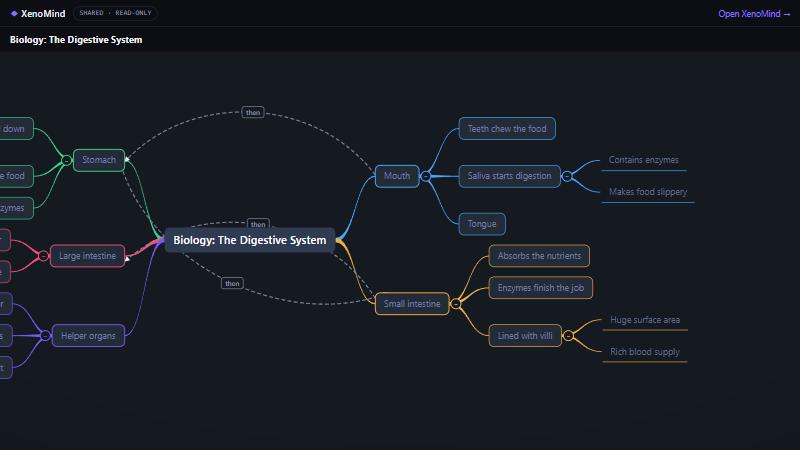
Image: "How to Mind Map" by zipckr, licensed CC BY 2.0.
A mind map turns one idea into a picture you can think with. Here is what a mind map is, when to use one, and how to build one in minutes.
What is a mind map?
A mind map is a diagram that starts with one idea in the middle and branches out into everything related to it. Because it is visual and colourful, a mind map is easier to take in - and to remember - than a long list of notes.
When to use one
- Brainstorming - get every idea out of your head and onto one page.
- Revising - turn a topic into a picture you can recall in an exam.
- Planning - break a big job into branches and smaller steps.
- Explaining - show a class or a team how the parts of a topic fit together.
How to make a mind map in XenoMind
- Start in the middle. Create a map and type your topic into the central node.
- Branch out. Press Tab to add a child, or Enter to add one alongside. Keep each branch to a few words.
- Colour each branch so the main themes stand apart at a glance.
- Add depth. Give branches their own children, and tuck detail into notes you can open when you need it.
- Collapse what you are not using to keep the map tidy as it grows.
- Let AI start it. Connect your own AI key and ask it to draft the first map from a sentence, then make it your own.
- Share it. Create a public link so anyone can view the map - no account needed.
A good first map takes a couple of minutes. Build one, then keep adding to it.
Try XenoMind free
Mind maps, flowcharts and spreadsheets, all in one place. Apply for access and start building today.
Apply for free access See how it works